



The Printer ICM
The Internet Capital Markets platform for memecoins — live on Solana, with Robinhood Chain very soon and BNB Chain next. AI that scans the whole chain in real time, grades what it finds, and pushes clean signals straight to your browser and your Discord — with a full dashboard, an AI agent and Runner Printer, the trading assistant, behind it. Automated trading is next.
Overview
The Printer, by Bobnet AI, started in January 2023 as a Telegram signal service. It has grown into an autonomous, self-learning AI system that analyses on-chain data around the clock and surfaces the memecoins worth watching — before they pump.
You get the calls where you already are — in the Chrome extension and in Discord — plus the Total Control Dashboard that shows the live track record. No 200-messages-a-day spam. No hidden results.
- Signals — entry and sell alerts, each graded by conviction.
- Delivery — the Chrome extension is the fastest seat in the house: the card is on your screen the moment it is published. Discord carries the same call seconds later, split by level, and the message updates itself if a safety check lands late.
- Dashboard — every confirmed signal, win rates, runners, sentiment.
- Automation — the Agentic Mode API is under construction; the ICM Fund (formerly AFK Mode), the engine trading its own signals end-to-end, returns after its recalibration, with its live wallet next.
Chains
The Printer is going multichain, one chain at a time. The dashboard now opens with a chain selector — pick a chain and everything behind the door (signals, stats, runners) belongs to it.
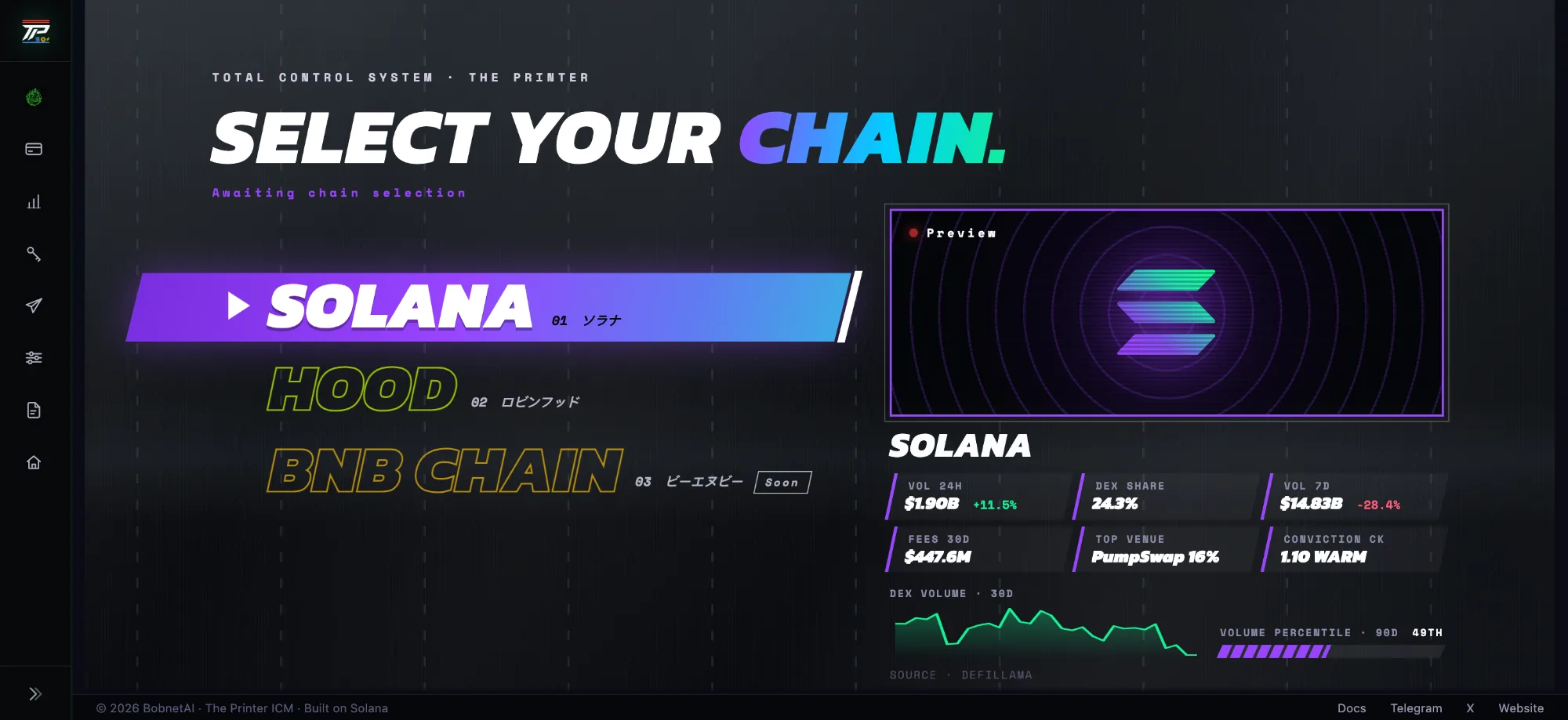
① Solana — live
The complete product: graded signals in the Chrome extension and Discord, Runner Printer, the Total Control Dashboard and the AI stack.
② Robinhood Chain — very soon
Robinhood Chain gets a pipeline of its own — its own token universe, price history and signals. It is not ready yet, but it will be running at 100% very soon.
③ BNB Chain & more — soon
Binance Chain and further chains will be introduced shortly — each one behind the same selector, with the same honest track record from day one.
The mission
Make degens' lives great again
Memecoin trading is mostly gambling — noise, scams, and 18-hour screen days. The Printer's mission is to replace the gambling with a bias-free system: scan everything, cut the traps, grade the survivors, and give traders an edge they can actually see and audit.
The goal isn't more signals — it's better ones, delivered with the conviction and the tools to act on them.
Core tech
An advanced, bias-free intelligence framework built to surface and grade memecoin signals before they run — the same framework on every chain we open.
- Real-time on-chain data — the engine reads every new token and every trade as it lands, chain by chain.
- Hundreds of signals per token — every token is measured across on-chain, trading and social data before it can reach you.
- Kill rules first — bundled launches, rugs, honeypots and wash trading are filtered out before anything reaches you.
- Graded output — survivors get a conviction score and a level, so every call carries how strong it is.
- Delivered the moment it fires — a graded call is pushed to the Chrome extension the moment it is published and reaches Discord seconds later, so what you read is what just fired.
You never need to touch the internals — the dashboard shows the outcome of every call the system makes.
Get access
- Join the Telegram community — the front door: announcements, drops and where to ask before you buy.
- Grab a membership.
- You unlock the private Discord where the signals land, the Chrome extension with Runner Printer, and the dashboard — with the ICM Fund to follow.
How members get into the dashboard
The Total Control Dashboard is gated. Hit Open Dashboard anywhere and the access popup opens — one popup, two paths, both ending in the dashboard.
The visitor clicks it → the access popup opens
the gated, members-only dashboard
Log in the way you like — a wallet signature, Google, Discord, Telegram or your email. We never ask for your seed phrase.
What a membership gets you
More than one way in
At checkout your paying wallet is captured alongside your email, X and Telegram, and you can also log in with Google or Discord. A membership is a bundle of those identities, so you can prove access more than one way:
What the access layer sees — and never does
The access layer is deliberately thin. Your trading edge lives elsewhere, behind its own wall.
The portal knows
- your wallet & balance
- your membership + expiry
- your contact from checkout
It never sees
- the trading alpha & signal logic
- the scoring recipe
- your keys or seed phrase — ever
Guide to use
Use The Printer as your trading partner, not a slot machine:
- Run the extension. It is where the call reaches you first — the live feed in the side panel, an alert window you can tune by level, and a safety check on every signal.
- Watch the level. Every call is tagged Netrunner / L1 / L2 / L3 — size to the level.
- Check sentiment. The dashboard's sentiment read tells you the backdrop you're trading into.
- Read the notice. When the market turns manic, a notice appears at the top of the extension and the dashboard — lower levels may fire more than usual, so trade them with extra care.
- Act cleanly. Open the chart straight from the signal — in the extension panel or from the Discord message — and use Runner Printer to see whether the move is still running before you size in.
- Respect the sells. When the system issues a sell, it's telling you the trade is done.
Overview
Total Control — the live face of the system for members. Signals reach you the moment they fire — near-instantly in the Chrome extension, seconds later in Discord — and the dashboard is the record and the context around them: performance, stats, the runners it caught, sentiment and metas.
Solana is live today. Robinhood Chain is not ready yet, but it will be running at 100% very soon, on its own pipeline and with its own dashboard.
Global Stats
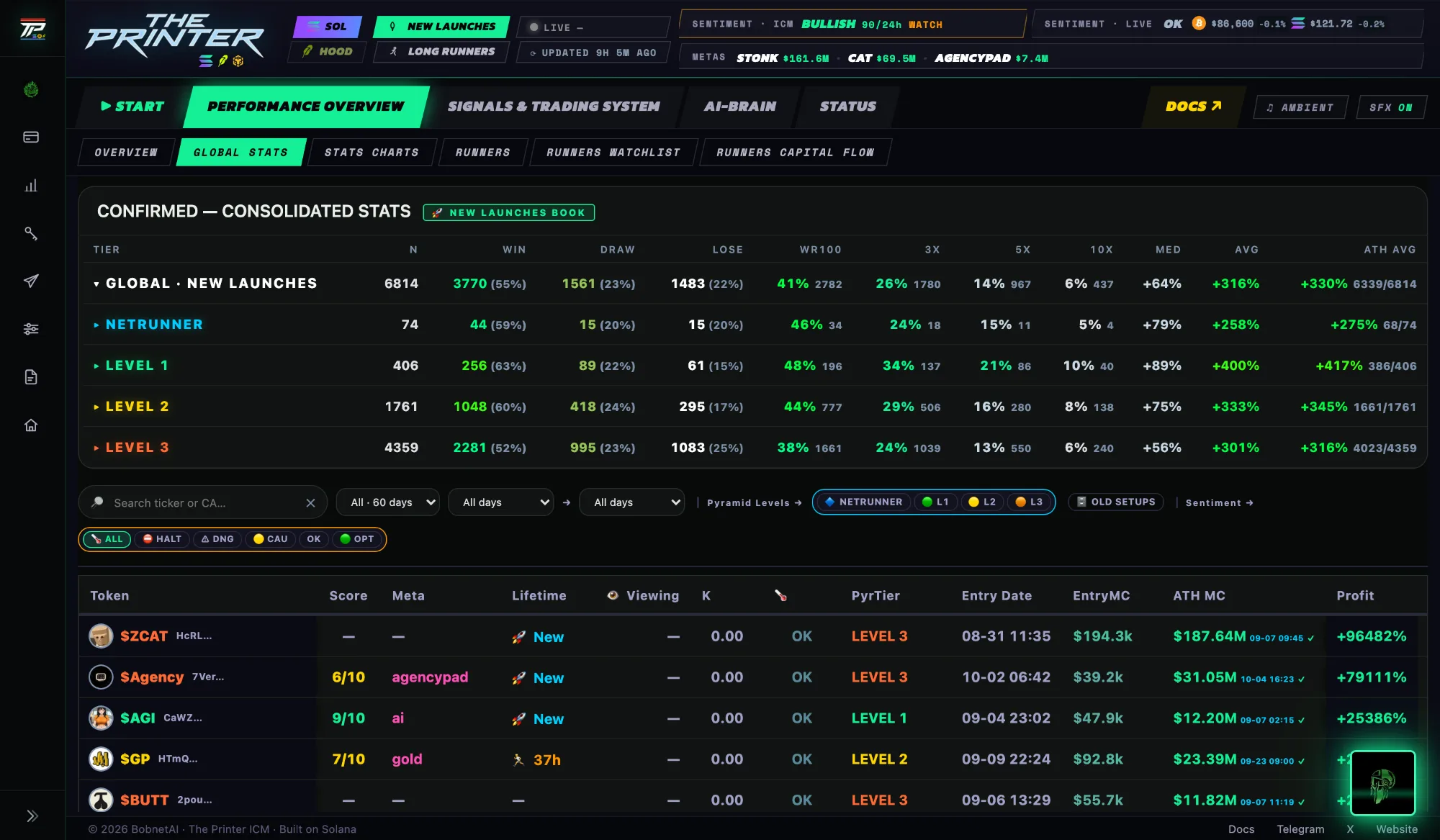
Pick a time range (the last hour up to the last 60 days) and see the whole system: win rate, median & average profit, tokens scanned and signals for the window, plus a per-level breakdown. The Global Statistics view lists every confirmed signal token-by-token — search by ticker or contract, tap to open the chart, and see entry → peak, profit and time-to-peak on each.
The headline numbers count one signal per token. Only a token's first call feeds win rate, WR100, 3× / 5× / 10× and the profit figures. Later calls on the same token stay listed — you can still see them and open their charts — but they never count twice, so a single winner can't inflate the record by being caught again. And the reads are independent of one another: the same token can appear under more than one of them, each scored on its own signals.
How win rate is measured — it changes with the mode
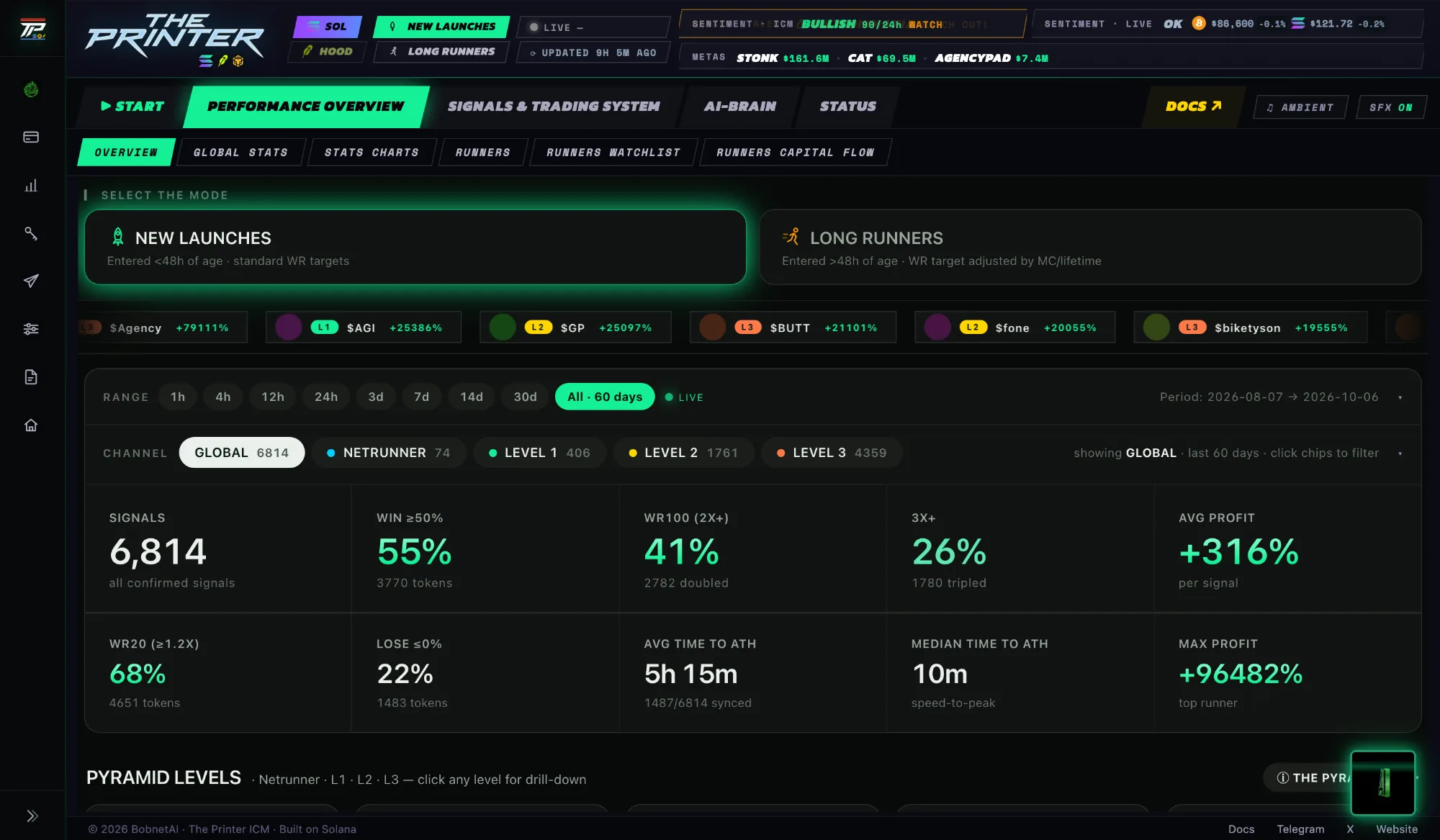
A "win" is not the same thing in the two dashboard modes, so always read the win rate against the mode it's shown in:
- 🚀 New Launches (entered <48h old) — a fixed target. The headline Win rate counts every signal that reached +50% or more.
- 🏃 Long Runners (entered >48h old) — the target scales down with entry market cap, because a bigger, older coin rarely doubles. A small runner still has to 2×; a large one only needs a smaller move to count:
| Entry market cap | Counts as a win at |
|---|---|
| < $50k | +100% (2×) |
| $50k – $150k | +75% |
| $150k – $500k | +50% |
| ≥ $500k | +30% |
Independently of the mode, the dashboard also shows absolute multiple rates — WR100 (hit 2×), 3×, 5×, 10× — which always mean the same thing. A loss is any signal that ends at or below its entry (≤ 0%); a draw is positive but short of the win target.
Stats Charts
The same performance data, plotted. Signal outcomes charted entry to peak, so you can read the shape of the system's edge at a glance instead of scanning rows.
Runners
The wall of fame: tokens the system caught that went 3× or more. Filter by level and by new-launch vs long-runner, switch between card and table view, and click any card to open the chart. Entry → peak on every one — the receipts page.
Runners Watchlist
The tokens from our signals that are still running right now, with their level — before they have necessarily made the wall of fame. Where you catch a runner while it is still running.
Chrome Extension
The flagship — everything that matters for trading, docked beside whatever you are reading
The signal feed, out of the tab — the Chrome extension is live, and it is the fastest way to get a call. Install it and The Printer follows you while you browse: every confirmed signal lands in the side panel the moment it is published, over a connection that stays open — no refreshing, no waiting for the next check.
This is the panel itself, not a mockup: the extension's own code and stylesheet, painting real signals on a 1-hour delay. The indicators behind every call are for members only — here they stay blurred.
- Every call, the moment it fires — the side panel sits next to whatever you are reading, and new calls are pushed to it over a live connection: no refreshing, no waiting.
- Alerts only for what you trade — pick the levels and the signal types, and get a notification, a pop-up window with the trade buttons and a sound.
- Runner Printer, your trading AI assistant — it ranks the calls that are actually running right now, with a live Runner Score, shows the whole run since the signal with one tap, and alerts you the moment a new runner starts.
- META MAP — every runner of the system on one chart, time against market cap: combine metas, keep only the newest launches, and pin any token to jump straight to its chart.
- Secret indicators on every card — the safety verdict, the story the token trades on and who leads it, how the token is doing right now, who is buying it, and more. Members see them all, explained piece by piece in the guide that lives inside the extension.
- Copy, and it's there — switch AUTO on and any token address you copy lands straight in the panel's search; tap 💬 Story for the narrative behind a token in one line.
- Bobnet AI, one tap away — ask the agent about any token without leaving the panel.
- One tap out — the chart, the sniper and your trading front-end sit on the card that just arrived.
Two minutes, once. Get a membership, add the extension from the Chrome Web Store (it works in Brave and Edge too) and paste the access code from your dashboard. Members only: an active subscription, one device at a time.
Runshot — a call, rendered
Every call the engine gets right is a story: the card as it arrived, its level, and the chart replayed from the entry to the peak. Runshot, the studio inside the extension, turns a signal into exactly that — a shareable video rendered from the real call. Three real examples, straight out of the tool.
Nothing in a Runshot is scripted or re-drawn: it replays the alert that was sent and the price action that followed it.
RunShots, posted automatically. When a call runs ×4 or more, the system renders it into a short video — the card exactly as it was sent, its level, and the chart replayed from the entry to the peak — and posts it to our official Telegram channel and to #runshots on Discord. Nothing is re-drawn: every RunShot replays a real alert and the price action that followed it.
How signals work
A signal is the system flagging something worth attention, generated autonomously from live on-chain data and optimised for profit potential. Each one moves through a lifecycle — hover any stage:
Scanning
Confirmed
Hold open
Sell
The signal card
Every call is delivered as a card — in the Chrome extension panel first, and in its Discord channel seconds later. The card carries what you need to act: the direction, the level, the entry market cap and how far the call has run — plus a row of secret indicators that members see in full.
Discord — one channel per level
Signals land in the private Discord in their own channels: New Launches and Long Runners, each split into Netrunner, Level 1, Level 2 and Level 3, plus one channel for sells. Each level pings its own role, never everyone. Every card carries an AI Analysis button, and if the safety check lands after a message is out, the message edits itself. Winning calls are posted in #wins and #runshots, next to the daily recap, the meta brain and the sentiment channels.
Levels & conviction
The classification system reads each token in real time and places it on one of four levels — the level is what sets the recommended size. Higher level = stricter filtering = higher conviction and bigger size.
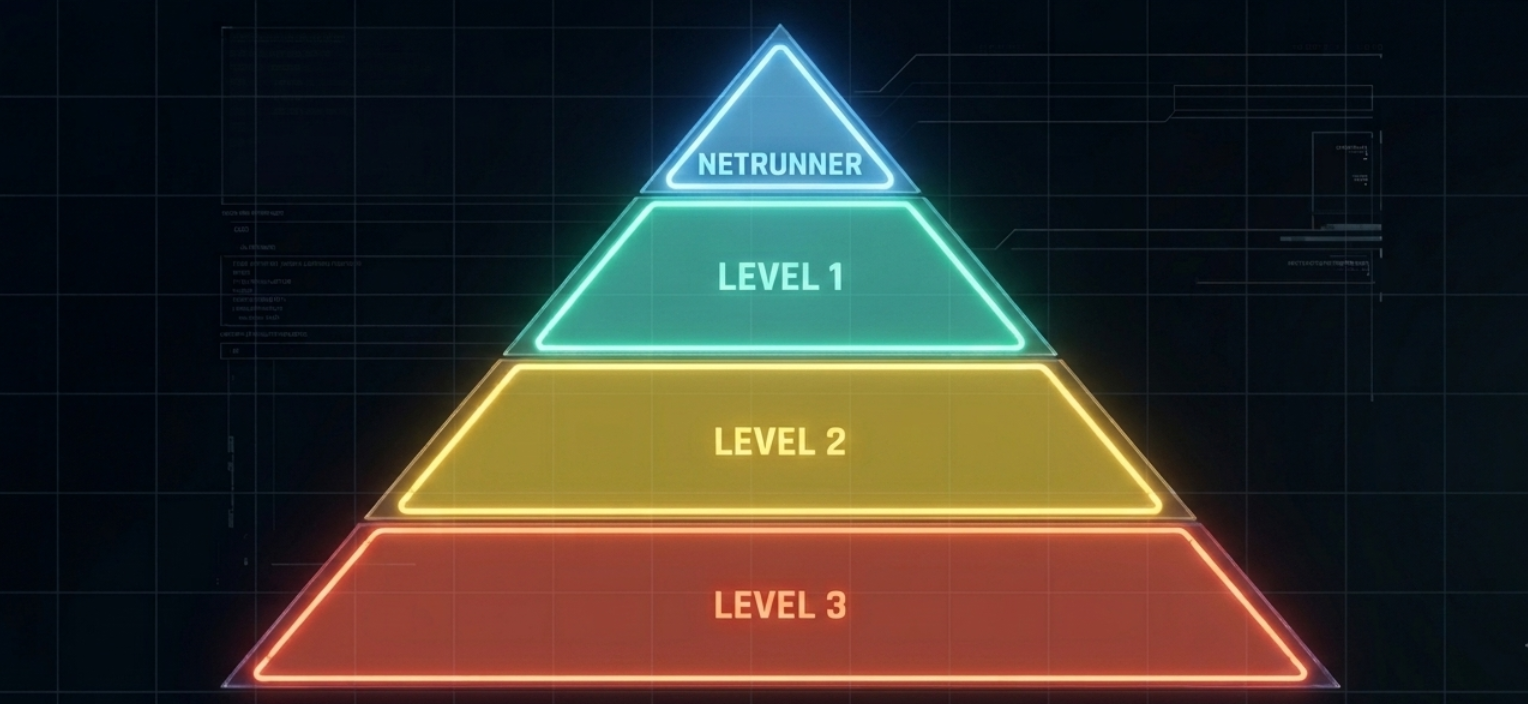
Higher tier → stricter filtering → higher conviction & bigger size
| Level | What it means | Sizing |
|---|---|---|
| 💎 Netrunner | Highest conviction — the cleanest, strongest calls | Biggest size |
| 🟢 Level 1 | Early runners — high-quality organic opportunities | Full size |
| 🟡 Level 2 | Core confirmation — solid, faster alerts | Medium size |
| 🟠 Level 3 | Widest net — most signals, minimal filtering | Small size |
How the levels actually work
- Many reads, one ladder. Signals come from a family of independent reads, each looking at the tape its own way. Every read's live results are tracked separately, token by token — none of them borrows another's record.
- Ranked by live win rate. Reads are placed into levels by their actual measured performance, and re-ranked as data accumulates. A level is a performance band, not a fixed rulebook — when a read proves itself, it moves up; when it decays, it moves down or gets retired.
- Netrunner is earned, not assigned. Only the reads holding the highest live win rates sit in 💎 Netrunner. It isn't a label we hand out — it's the top of the measured table, and that's why it carries the biggest size.
- A token climbs, it never repeats. Every call lands on one of four levels — Level 3, Level 2, Level 1 or Netrunner — each calibrated on its own measured results. A token can be called again only when it climbs: Level 3 → Level 2 → Level 1 → Netrunner. The same level never repeats and a call never steps down, so one token reaches you at most four times — each time with more conviction, and each call recorded in Global Stats at the level it was sent.
All of it is auditable: open the dashboard, filter any level, and every signal behind its win rate is right there — entry, peak, profit.
Signal types
Every signal falls into one of two modes — the dashboard splits all of its stats the same way:
New Launches
Entered <48h of age — early-stage winners caught right as they launch, standard WR targets.
Long Runners
Entered >48h of age — established momentum that's still running, WR target adjusted by market cap.
Runner Printer
Your trading AI assistant, inside the Chrome extension. The signal feed tells you what just fired; Runner Printer tells you what is still running. It follows our signals after they fire and ranks, minute by minute, the ones that are actually running right now — each with a live Runner Score that reads whether the move is still worth holding — and a new runner gets its own alert. Tap any row for the whole run since the signal: the play, the score minute by minute, its signals and its waves. Members only: it lives in the extension, and members can also open it inside the dashboard.
Terminal coming soon
An innovative trading interface that replaces manual chart analysis — the command deck for reading the tape and acting on it without leaving the dashboard.
Agentic Mode API under construction
The Agentic Mode API is under construction and not on sale for now. A mode shows its paper results on the home page while it makes money in the market we are in; the others are under construction.
Non-custodial by construction
- No account, no login. There's nothing to sign up for: the wallet that pays is your only identity.
- Your key never leaves your machine. Your assistant creates a wallet on your computer (or uses one you already have). The key file stays there, readable only by you, and is never sent anywhere.
- We don't hold your funds. Every payment is signed by your own key, on your own machine, and can only go to The Printer's wallet — the agent refuses any other address.
How payment works — x402
Each signal is paid for individually over x402, an open protocol that turns the HTTP "402 Payment Required" status into a real payment: the moment a signal fires, your agent sees it on sale, pays 5 USDC on Solana for that one signal, and receives it. Seeing what's on sale is free and reveals nothing about the token — you only pay for a signal you actually get. No SOL is needed: the network fee is paid by the payment facilitator.
There is nothing to pick: it is the ICM Fund setup — NETRUNNER and Level 1 signals. You set a daily budget; nothing is ever spent above it. Signals are sold only live — within 30 minutes of firing — never as history. If a token you bought gets a sell signal, it reaches you at no extra cost.
What "installing" actually does
Paste one block into Claude Code or Codex. It downloads a single self-contained program for your system (its checksum is verified), registers it as a tool in your assistant, and your assistant walks you through setup in the chat: create or choose a wallet, fund it with USDC, set a daily budget. A small background process then buys each new signal within your budget and notifies you. macOS and Linux (Windows: WSL).
Install The Printer Agentic Mode API on this machine and set it up with me.
1. Run: curl -fsSL https://api.theprintericm.com/apimode/install.sh | sh
2. Then follow the "ASSISTANT:" instructions the installer prints.
What it does not do (yet)
Version 1 does not trade for you: it buys and delivers the signals, and you decide what to do with them. Signals are information, not financial advice.
ICM Fund recalibrating
The ICM Fund — formerly AFK Mode — is the engine trading its own signals end-to-end: entries at the levels cleared for autotrading, sizing by conviction, and exits by a profit ladder, a trailing stop and a hard stop. The simulation is being recalibrated and returns to the ICM Fund tab soon; the live execution wallet comes after it.
How it trades
- Entries — only confirmed signals at the conviction levels cleared for autotrading, taken at the moment they fire. A level that has not earned its size is not traded at all.
- Sizing — each entry is sized by its conviction, so exposure follows the strength of the call automatically.
- Exits — a profit ladder takes partial profits into strength, a trailing stop rides whatever's left, and a hard stop protects the downside. No emotion, no hesitation.
When the live execution wallet connects, the same tab switches from the simulation to the real thing. The Printer never asks for your seed phrase.
Coming soon
Interactive AI Agent
The agent takes the controls — run the whole dashboard, and the Sniper, with nothing but prompts. This milestone completes the beta MVP, and access closes behind it.
Agentic Trading
Agentic Mode API is under construction; automatic execution with your own key and the integrated Sniper come next.
New chains
Robinhood Chain is not ready yet, but it will be running at 100% very soon. BNB Chain is next, with more behind it. See Chains.
Meta-Brain
Memecoins move in waves around a story — a meta. For every live meta the Meta-Brain names its metarunner, the leading token the market is trading right now, and its betaplays, the newer tokens riding the same story. Metas are ranked live by how hot each one is running, and every leader shows its state — pumping, consolidating, falling or new — because a betaplay is only as strong as the wave above it. In the extension every signal card shows its meta and its role, so you always know whether you are buying the leader or a follower.
Sentiment
The market backdrop you're trading into — split into three questions, each answered by its own live read:
① Macro
"How's the sea today?"
The big-picture read — bullish, neutral or risk-off — from BTC/SOL trend and systemic liquidity, refreshed daily.
② Momentum
"What's minting right now?"
A live read on how many clean runners the chain is producing this hour, and how much of that is pump-and-dump froth versus the real thing — the selectivity of the moment.
③ Trading, live
"Is anything killing me right now?"
Real-time BTC/SOL price action plus a kill-switch check — the fastest-moving layer, catching a sudden risk-off move mid-session before it hits your bag.
When conditions sour, the system tightens up automatically. The tab also carries a live recap of what's moving on X (Twitter) alongside the three reads.
Signal pace. The same tab counts today's signals by level, live, against a normal day — so you can see at a glance when the market is running hotter or colder than usual.
Market notice. When the market turns manic, a notice switches on by itself at the top of the extension and the dashboard — "Shitcoinmania: Watch out!": calls are running well above a normal day, so lower levels may fire more than usual and deserve extra care. It clears itself when the pace returns to normal.
AI Agents
Meet Bobnet AI — the one AI Agent live today. It lives on the dashboard and inside the Chrome extension, wired into the same data the engine trades on: ask it and it pulls the on-chain picture for you, or let it read a single signal and tell you what it sees.
Talk to it in the dashboard or right inside the Chrome extension — pop the chat out into its own window and it shows the tokens it mentions with their picture and their post on X. Every Discord signal card also carries an AI Analysis button.
Default behavior
- Talks trading, on your data. Ask it about signals, win rates, runners, metas or sentiment — it answers from the live system, not from canned text.
- Sees what you see. It reads the live dashboard state while you chat, so "what am I looking at?" gets a real answer.
- Works with real tools. For deeper questions it queries the system's own data layers — and shows what it's doing while it digs.
- Reads one signal at a time. From the extension, a tap on any signal card runs an AI read on the token behind it — what it is, what the chain is doing, where the risk sits.
- Speaks your language. Ask in English, Spanish, Chinese, whatever — it locks onto the language you use.
- Guards the alpha. It explains the system without leaking the recipe — the edge stays behind the wall.
Chatting runs on agent credits, bundled with every membership — see Get access.
T-Bob & Asira — the faces on X
The system's two characters live on X for now — fronting the brand while Bobnet AI runs the desk.
The operator character — talks metas, signals and deployer culture on X.

The analyst character — narrates sentiment and market stories on X.
Roadmap
The plan is deliberately adaptive — ship, learn, iterate.
Phase 1 — The Printer ICM & AI Agents launch
Ship the core product: the signal engine, the Total Control Dashboard, and the first AI agents.
Phase 2 — 2026 expansion
Mainstream the AI and expand the automation. Shipped so far: the Chrome extension — now the flagship, with Runner Printer inside — Agentic Mode API (under construction), signal delivery in Discord with one channel per level, automatic RunShots of the calls that run, and live metas on every card. Next up: Robinhood Chain at 100% (very soon), the Terminal, the ICM Fund live wallet, BNB Chain, and the interactive AI Agent that runs the dashboard and the Sniper on prompts.
Phase 3 — the doors close
The interactive agent completes the beta MVP. When it ships, access closes — the member cap locks and new seats stop being sold.
Team
A core team of development, trading and marketing specialists, plus early supporters. Explicitly built as a long-term product — not a pump & dump project.
FAQ
Is this financial advice?
No. The Printer provides data and educational information only. Every trade is your own decision — see Risk & legal.
What is the ICM Fund?
The automated mode (formerly AFK Mode) where the engine trades its own signals end-to-end — entries, conviction-based sizing, ladder exits. Its simulation is being recalibrated and returns to the dashboard's ICM Fund tab soon; the live execution wallet comes after it. See ICM Fund.
Which chains are supported?
Solana is live today and carries the full system. Robinhood Chain is not ready yet, but it will be running at 100% very soon, on its own pipeline. BNB Chain and more follow. See Chains.
How fast are the signals?
Real-time. A signal reaches the Chrome extension the moment it is published and Discord seconds later — pushed over a live connection, not polled. If the safety check clears after a message is already out, that message is edited so you see it.
Where do the signals arrive?
Two places, both live: the private Discord, with one channel per level, and the Chrome extension side panel. Telegram is the front door and the announcement channel — it is not where signals are delivered. See Chrome Extension.
What is Runshot?
A studio inside the Chrome extension: it turns a signal into a ready-to-post promo video — the alert as it arrived, its level, and the chart replayed from the call onward. When a call runs ×4 or more, the system renders its RunShot on its own and posts it to our official Telegram channel and to #runshots on Discord.
What is Runner Printer?
The trading assistant inside the Chrome extension. It ranks our signals that are running right now, with its live Runner Score under the chart, and alerts you when a new runner starts. See Runner Printer.
Why did I get the same token twice?
Because it climbed. A token is called again only when it reaches a higher level (Level 3 → Level 2 → Level 1 → Netrunner); the same level never repeats. See Levels & conviction.
What does "Shitcoinmania: Watch out!" mean?
Calls are running well above a normal day, so lower levels may fire more than usual. Trade them with extra care: the notice switches on by itself and comes down by itself when the pace returns to normal. See Sentiment.
How do you count a win?
From the signal's entry price, against the target of its dashboard mode — see Global Stats. WR100 counts every call that reached 2× from entry, and 3×, 5× and 10× are shown too. Every call counts from the moment it fires and never leaves the record.
Do you hold my funds?
Never. The ICM Fund trades from your own wallet — you keep custody and keys at all times. We will never ask for your seed phrase.
What do I need to get in?
Grab a membership — start at the Telegram front door, or go straight to Get access. Membership opens the private Discord, where the signals land, plus the dashboard and the Chrome extension.
Will access stay open?
Not forever. The beta MVP is open and capped today; when the interactive AI Agent ships, access closes to new members. If you want in, this is the window.
Can I lose money?
Yes — memecoins are extremely high-risk and you can lose everything you put in. Only trade with money you can afford to lose completely.
Risk & legal
Trading crypto is risky. The Printer provides data and educational information only — not financial advice. Memecoins — on Solana, Robinhood Chain, BNB or any other chain — are extremely high-risk and you can lose all of your funds. Past performance never guarantees future results. You bear full responsibility for any decisions or losses.
See the full Terms of Service, Privacy Policy and Disclaimer.
See you in the trenches.
Hasta la vista, baby!


 Binance